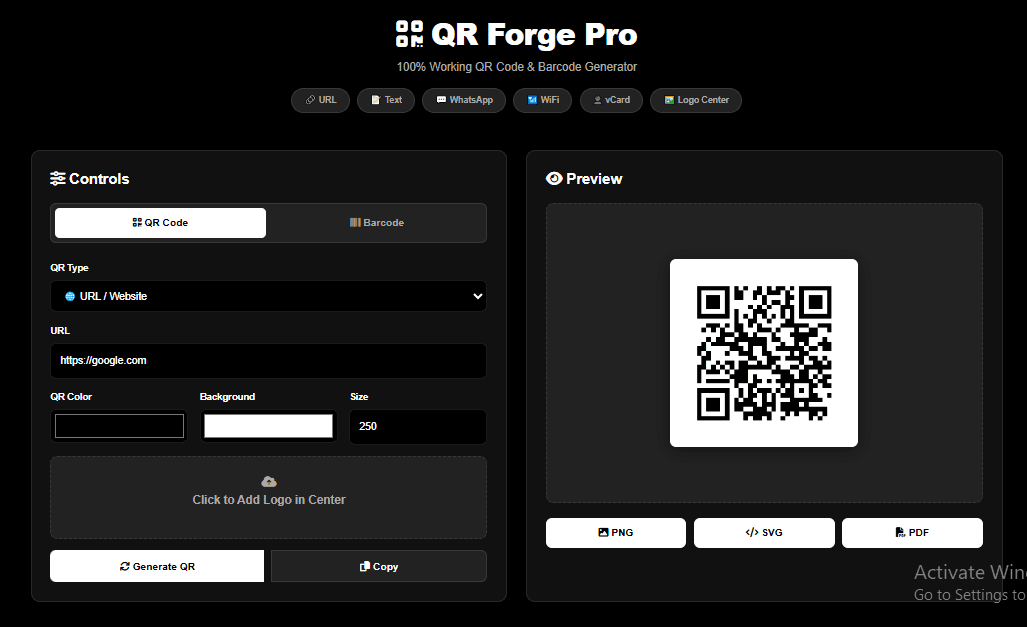
From menus and business cards to WiFi access and product labels, QR codes and barcodes have quietly become essential tools for modern business and everyday life. QR Forge, the free browser-based generator from Gdgraphic.com, makes creating them effortless—with no signup, no watermarks, and absolutely zero cost.
Featuring 6 versatile QR code types, 3 industry-standard barcode formats, and full design customization, it covers nearly every personal and professional use case.
Create Your Custom QR Code Instantly:
Try the tool completely free:
What Makes QR Forge the Best Free QR Code Generator?
Unlike other online tools that hide high-resolution downloads behind expensive paywalls or force ugly watermarks onto your designs, QR Forge is 100% free, forever.
Because it is a browser-based application, all processing happens locally on your device. Your sensitive data—like WiFi passwords, contact details, or personal links—is never uploaded to an external server. This makes QR Forge one of the safest and most private QR generators available online.
6 Types of Custom QR Codes You Can Create for Free
QR Forge supports 6 powerful QR code types, allowing you to bridge the gap between physical marketing and digital experiences in under 60 seconds:
URL QR Codes: Link customers directly to your website, landing page, online menu, or social media profiles.
WiFi QR Codes: Share internet access securely. Enter your SSID and password so guests can connect instantly at your home, cafe, or restaurant without typing a thing.
WhatsApp QR Codes: Direct users straight to a pre-filled chat window. It’s the perfect customer support channel for flyers, product packaging, or storefronts.
vCard Digital Business Cards: Share your name, phone, email, and company details. When scanned, your contact info is saved directly to the user’s phone.
Text QR Codes: Share static text, instructions, event details, or promotional codes without requiring an active internet connection.
Email/SMS QR Codes (Default Utility): Set up instant email drafts or pre-filled SMS messages for easy customer interactions.
Integrated Free Barcode Generator for Retail & Inventory
Aside from QR codes, QR Forge doubles as a professional barcode generator. It supports three of the most widely used barcode formats globally:
| Barcode Format | Best Used For | Geographic / Industry Standard |
| EAN-13 | International Retail | Standard for retail products outside of North America. |
| UPC | North American Retail | Standard for consumer goods sold in the US and Canada. |
| CODE128 | Internal Inventory & Logistics | Supports alphanumeric data; ideal for warehouse tracking and shipping labels. |
How to Customize and Brand Your QR Codes
Make your QR codes pop by matching them to your brand identity using QR Forge’s built-in styling suite:
1. Add a Custom Logo
Upload your brand logo (PNG or JPG) to place it dead-center in the QR code. To keep the code easy to scan, make sure your logo takes up less than 25% of the total QR code area.
2. Custom Color Styling
Go beyond standard black-and-white. You can change both the foreground and background colors. SEO Tip: Always maintain a high contrast (e.g., dark foreground on a light background) to ensure quick scanning across all smartphone cameras.
3. Choose Your Perfect Export Format
PNG: Best for social media, email newsletters, and general web graphics.
SVG: Infinitely scalable vector format, perfect for graphic designers, high-res print layouts, and website integration.
PDF: Ideal for multi-page print documents, posters, and professional label sheets.
Step-by-Step: How to Create Your Free QR Code Online
Go to QR Forge on Gdgraphic.com.
Select your mode: QR Code or Barcode.
Choose your specific type (e.g., WiFi, URL, or EAN-13).
Enter your details in the input fields.
Customize your colors and upload a logo if needed.
Click Generate and instantly download your file in PNG, SVG, or PDF!
Frequently Asked Questions (FAQs)
1. Is QR Forge really free to use?
Yes! QR Forge is 100% free with no account registration, no subscription fees, and no watermarks on your downloaded assets.
2. Can I use these QR codes for commercial projects?
Absolutely. All generated QR codes and barcodes are completely yours to use commercially, royalty-free, with no usage limits.
3. Is my data safe when using QR Forge?
Yes. Because the generator is entirely browser-based, all encoding is processed locally in your browser. None of your inputs or uploaded logos are sent or stored on our servers.
4. Why won’t my colored QR code scan?
If your QR code isn’t scanning, check the color contrast. Smartphone cameras require a distinct contrast difference between the background and foreground blocks to read the data correctly.
5. What is the best size for a QR code on a business card?
For standard business cards, we recommend a minimum size of 2cm x 2cm (or 200px) with high contrast to ensure quick scanning.