Select a Design Framework
Pick a template to start organizing your professional journey
Aurora
Soft gradient glow
PopularMono
Bold black & white
Press
Newspaper masthead
Tech Grid
Dark mode developer
Pastel
Soft & friendly
Block
Bold rectangular
Banner
Full-width strip
Chrono
Timeline journey
Letterhead
Formal & plain
Neon
Dark & vibrant
Kraft
Warm rustic paper
Badge
Playful skill chips
Rail Left
Slim icon sidebar
Rail Right
Mirrored icon rail
Duo
Two-column body
Refine Your Professional Profile
Core Details
Click any section to open/close - Multiple sections can stay open at once
Personal Information
Work Experience
Education
Key Expertise
Real-time Output
CV generator: the complete free guide to building a professional resume online
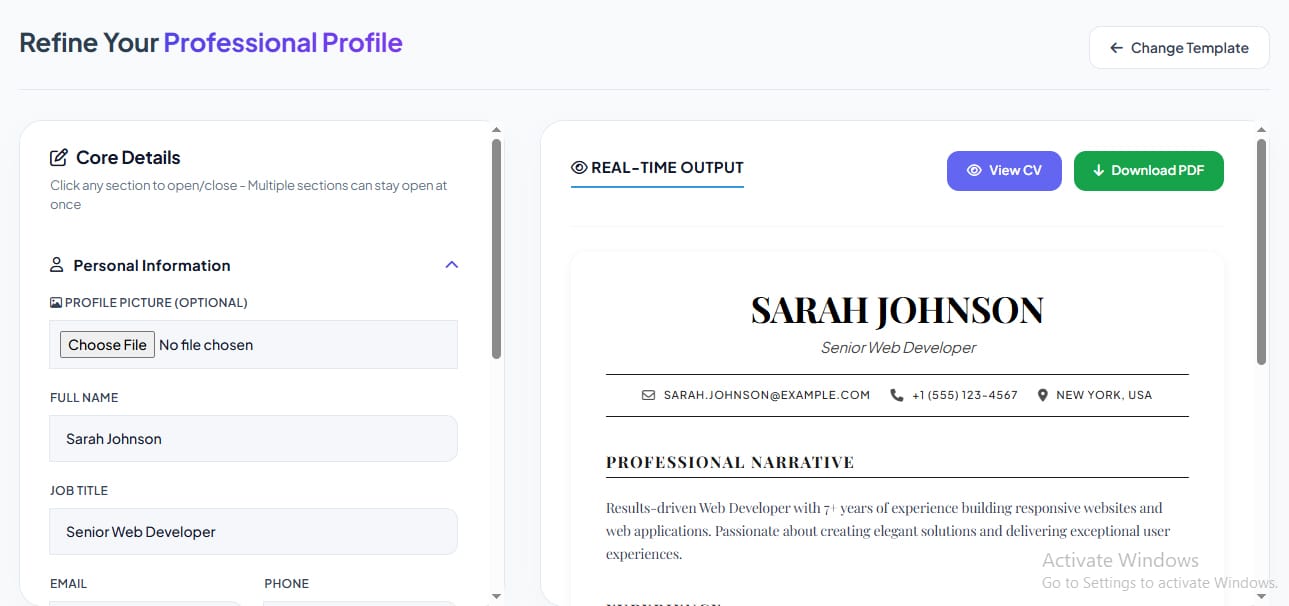
Job hunting is stressful enough without wrestling with resume formatting. CV Generator, the free online tool from GD Graphic, lets you build a polished, professional resume in minutes — no software, no sign-up, and no design skills needed. With 10+ templates, live preview, and instant PDF download, it’s built for everyone from fresh graduates to senior executives. Here’s everything you need to know.
1. What Makes CV Generator The Best Free Online Resume Builder
CV Generator requires no account creation or software installation. Pick a template, fill in your details, and watch your resume build itself in real time — all directly in your browser, completely free.
2. How To Create A Professional CV Online Free
Start by choosing a design framework, then fill in your personal information, work experience, education, and skills using the guided form. Your resume updates instantly on the preview panel as you type.
3. 10 Free Resume Templates To Choose From
From Modern and Classic to Creative, Minimal, Professional, and Elegant, plus four sidebar-style two-column layouts, there’s a template suited to every industry and personal style.
4. Modern vs Classic CV Templates: Which One Should You Choose?
The Modern template uses clean lines and a centered header — ideal for tech and marketing roles. The Classic template uses traditional serif typography, better suited for legal, academic, or corporate applications.
5. Creative Resume Design For Designers And Marketers
The Creative template features a bold gradient header and rounded accents, helping designers, artists, and marketers showcase personality alongside professionalism.
6. Minimal CV Template: Why Less Is More
The Minimal template strips away unnecessary decoration, using clean typography and generous white space — a strong choice for roles where clarity and simplicity matter most.
7. Professional Resume Format For Executives And Managers
With a bold dark header and structured sections, the Professional template is designed for leadership roles where an authoritative, corporate tone is expected.
8. Sidebar Resume Templates: Two-Column CV Formats That Stand Out
Sidebar Modern, Sidebar Dark, Sidebar Colorful, and Sidebar Elegant templates organize contact details, education, and skills in a side panel — a format that’s both visually striking and easy to scan.
9. Is Your Resume ATS-Friendly?
Applicant Tracking Systems scan resumes for structured, readable text. CV Generator’s clean HTML-based templates keep formatting simple and consistent, helping your resume pass automated screening.
10. How To Add A Photo To Your CV
Simply upload a profile picture in the Personal Information section. It’s optional — some regions and industries prefer photo-free resumes — and can be removed anytime with one click.
11. Live CV Preview: Real-Time Resume Editing
Every change you make — from your job title to your skills list — appears instantly in the preview panel, so you always know exactly how your finished resume will look.
12. How To Download Your Resume As PDF Instantly
Once your CV is ready, click Download PDF to generate a high-quality, print-ready document in seconds — no third-party software or conversion tools required.
13. Best Resume Builder For Freshers
New to the job market? The guided accordion sections make it easy to build your first CV step by step, even with limited work experience, using pre-filled examples as a starting reference.
14. How To Add Work Experience And Skills To Your Resume
Use the Work Experience section to list company names, positions, durations, and achievements, and the Skills section to add unlimited competency tags — both update live in your preview.
15. Best Resume Builder For Web Developers And Tech Professionals
With clean, modern templates and skill-tag formatting built for listing technologies like JavaScript, React, or PHP, CV Generator is especially well-suited for developers and IT professionals.
Final Thoughts
CV Generator brings together everything needed to build a professional resume — multiple templates, live preview, photo support, and instant PDF export — in one free, browser-based tool. Need a matching invoice to send alongside your work? Try our Invoice Generator. Whether you’re a fresh graduate or a seasoned executive, you can have a polished CV ready in minutes.
Try CV Generator free at Gdgraphic.com and build your professional resume today.
Frequently Asked Questions (FAQs)
- Is CV Generator really free to use?
Yes. CV Generator is 100% free with no sign-up or account creation required.
- Do I need design skills to create a good resume?
No. Simply choose a template and fill in your details — the tool handles all formatting and design automatically.
- Can I add a photo to my CV?
Yes. Photo upload is optional and available in the Personal Information section, with a one-click remove option.
- How many resume templates are available?
There are 10+ templates including Modern, Classic, Creative, Minimal, Professional, Elegant, and four sidebar-style two-column layouts.
- Can I download my resume as a PDF?
Yes. Click the Download PDF button to instantly generate a high-quality, print-ready PDF version of your resume.
- Are the templates ATS-friendly?
Yes. All templates use clean, structured formatting designed to be readable by Applicant Tracking Systems used by most employers.
- Can I add unlimited work experience and skills?
Yes. You can add as many work experience entries, education records, and skill tags as you need using the Add buttons in each section.
- Does the resume update in real time as I type?
Yes. The live preview panel updates instantly with every change, so you always see exactly how your final resume will look.