Studio Invoice Engine
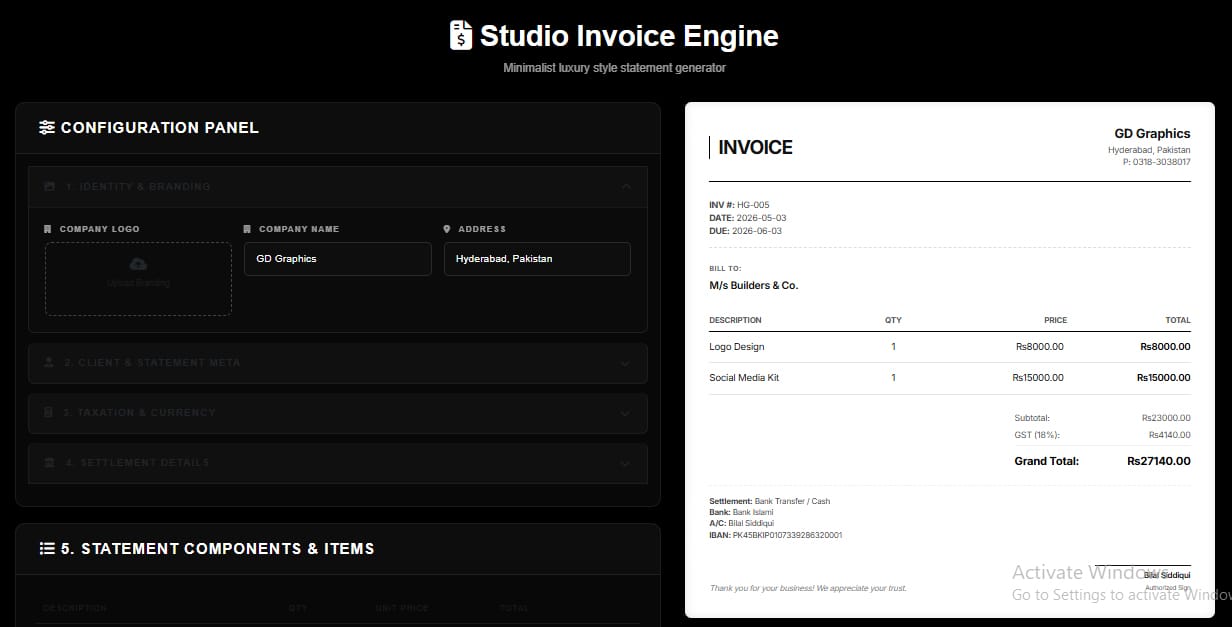
Professional invoice generator with live preview
The complete guide to invoice generators: everything small businesses and freelancers need to know
What is an invoice generator and why is it essential for small business?
An invoice generator is an online tool that lets you create professional, itemized bills for clients without designing them from scratch in Word or Excel. For small businesses, it eliminates formatting errors, ensures consistent branding, and speeds up the billing cycle — directly improving cash flow since clear, professional invoices get paid faster than messy, handwritten ones.
Creating a professional invoice in 5 minutes with a free invoice generator
Most free invoice generators follow a simple flow: enter your business details, add the client’s “Bill To” information, list line items with description, quantity, and unit price, then let the tool auto-calculate the subtotal and total. Within five minutes you have a polished invoice ready to send — no signup or design skills required.
Best online invoice maker tools — what to look for
When comparing invoice maker tools in 2026, prioritize features like live preview, PDF export, logo upload, multi-currency support, and built-in tax/discount fields. The best tools combine simplicity with these professional touches, letting freelancers and small teams produce invoices that look like they came from a dedicated accounting department.
Downloading your invoice as a PDF
After filling in your invoice details, look for a “Download PDF” or “Print Invoice” button. Most generators use browser-based PDF conversion (often powered by libraries like jsPDF), turning your on-screen invoice into a clean, print-ready file instantly — perfect for emailing directly to clients or archiving for your records.
Adding your logo for branded invoices
Uploading your business logo transforms a generic invoice into a branded document. Look for an “Upload Logo” option near the top of the invoice form, place a square or horizontal logo file, and it will appear in the header alongside your business name — reinforcing professionalism and brand recall with every invoice sent.
Professional invoicing for freelancers
Freelancers benefit enormously from invoice generators because consistent, professional billing builds client trust and reduces payment delays — pair it with our CV Generator to keep your entire client-facing paperwork looking equally polished. Include clear payment terms, itemized service descriptions, and your preferred payment method on every invoice to minimize back-and-forth questions and speed up the approval process on the client’s end.
Using invoice template generators for reusable templates
Rather than rebuilding an invoice from scratch every time, save a template with your business details, logo, and standard line items pre-filled. This is especially useful for recurring services, letting you simply update the date and amount for each new billing cycle.
No-signup invoice tools
Many users prefer invoice generators that require no account creation. These tools work entirely in the browser, generate the invoice instantly, and let you download or print without ever sharing an email address — ideal for one-off invoices or anyone wary of subscription-based software.
Custom invoice generators and business identity
A custom invoice generator lets you adjust colors, fonts, and layout to match your brand identity beyond just adding a logo. This consistency across every client touchpoint — website, emails, and invoices — builds a more cohesive, trustworthy brand image.
Creating an online invoice: a beginner’s walkthrough
For first-time users: start with your business name and address, add the client’s billing details, list each product or service with quantity and price, apply any tax or discount, review the auto-calculated total, and export as PDF. That’s the entire workflow from start to finish.
Adding tax and discounts
Look for dedicated fields labeled “Sales Tax,” “No Tax,” “Percentage,” or “Fixed Amount” — or double-check your math beforehand with our Calculator Hub. These let you apply either a flat discount or a percentage-based deduction, and similarly calculate tax automatically on the subtotal — removing manual math errors from your billing process.
Multi-currency invoicing for international clients
If you work with clients abroad, choose an invoice generator supporting multiple currencies (USD, EUR, GBP, PKR, INR, and others). Selecting the correct currency symbol ensures there’s no confusion about the amount owed, which is critical for avoiding payment disputes with overseas clients.
Adding bank details and IBAN
Including your bank account number, IBAN, and payment method directly on the invoice removes friction for the client — they don’t need to email back asking how to pay. This single addition often shortens payment turnaround time significantly.
Using live preview while building invoices
A live preview pane shows exactly how your invoice will look as you type, updating in real time. This prevents formatting surprises after download and lets you catch typos or layout issues before the invoice ever reaches your client.
Billing invoice generators for recurring clients
For ongoing client relationships, save a base invoice template and simply duplicate it each billing period, updating only the date, invoice number, and any variable line items. This consistency makes your billing process faster and your records easier to track over time.
Simple vs advanced invoice generators
Simple tools are ideal for one-off invoices with minimal fields, while advanced tools offer multi-currency support, tax automation, and template saving. Choose based on your billing frequency — occasional freelancers need simplicity, while growing businesses benefit from advanced features.
Printing invoices online
Most invoice generators include a direct “Print Invoice” button that opens your browser’s print dialog with a clean, formatted layout — useful for clients who still prefer physical paperwork or for keeping printed records for accounting purposes.
Why watermark-free invoices matter for branding
A watermark on your invoice signals you’re using a free, unbranded tool, which can undercut the professional image you’re trying to project. Choosing a no-watermark invoice generator ensures your document looks fully custom and client-ready.
Tips for small business owners
Keep line item descriptions clear and specific, always include a due date, double-check tax calculations, save copies of every invoice sent, and maintain consistent invoice numbering for easier bookkeeping and tax season preparation.
Faster payments through professional invoicing
Clear, well-branded invoices with explicit payment terms and bank details consistently get paid faster than informal billing methods. For freelancers and small businesses alike, investing five minutes in a polished invoice often translates directly into improved cash flow and stronger client relationships.
Conclusion
From quick PDF downloads to multi-currency support and branded templates, a good invoice generator covers every need of modern freelancers and small businesses. Mastering these features — logo upload, tax/discount fields, bank details, and live preview — turns billing from a chore into a fast, professional process that helps you get paid on time.
Invoice generator — frequently asked questions (FAQs)
Q1. What is an Invoice Generator and why is it important for small businesses?
An invoice generator is a free online tool that helps you create professional, itemized billing documents for your clients in minutes. For small businesses, it is essential because it eliminates manual formatting errors, ensures consistent branding on every document, and speeds up the payment cycle. A clean, professional invoice builds client trust and signals that your business operates with professionalism — which directly leads to faster payments and stronger client relationships.
Q2. How can I create a professional invoice in just 5 minutes using a free invoice generator?
Using a free invoice generator is extremely simple. Open the tool, enter your business name and address, fill in the client’s “Bill To” details, add line items with descriptions, quantities, and unit prices, apply any tax or discount if needed, and click download or print. The tool auto-calculates all totals for you. The entire process takes under five minutes and requires no design or accounting skills.
Q3. What should I look for when comparing the best online invoice maker tools in 2026?
When choosing an invoice maker, look for these key features: live preview while editing, one-click PDF download, logo upload support, multi-currency options, built-in tax and discount fields, bank detail fields including IBAN, no watermark on free plans, and no mandatory signup. The best tools combine all these features in a simple, fast interface without requiring you to create an account.
Q4. How do I download my invoice as a PDF?
After filling in all your invoice details, simply click the “Download PDF” or “Print Invoice” button provided by the tool. The generator converts your on-screen invoice into a perfectly formatted PDF file instantly. You can save it to your device, email it directly to your client, or print a physical copy for your records — all without any additional software.
Q5. How do I add my business logo to create a branded invoice?
Look for an “Upload Logo” button near the top section of the invoice form. Click it, select your logo file (PNG or JPG works best), and it will automatically appear in the header of your invoice alongside your business name. A branded logo on every invoice reinforces your professional image and makes your business more memorable to clients.
Q6. How should freelancers use a professional invoice generator effectively?
Freelancers should include their full name or business name, contact details, a unique invoice number, clear service descriptions, payment due date, and their preferred payment method on every invoice. Using a professional invoice generator ensures all these elements are neatly organized. Consistent, professional invoices reduce client questions about billing and significantly speed up payment approvals.
Q7. Can I create reusable invoice templates using an invoice template generator?
Yes. Save your invoice with your business details, logo, standard line items, and payment terms pre-filled as a base template. For each new client or billing cycle, simply update the client name, date, invoice number, and any variable amounts. This saves time, keeps your invoices consistent, and makes record-keeping far easier over time.
Q8. Is it possible to create an invoice without signing up for an account?
Absolutely. Many invoice generators work entirely within your browser with no account creation required. You simply open the tool, fill in your details, download or print your invoice, and close the page. No email address, no subscription, and no hidden fees. These no-signup tools are ideal for occasional billing or anyone who prefers not to share personal data with an online service.
Q9. How can a custom invoice generator help reflect my business identity?
A custom invoice generator lets you go beyond just adding a logo. You can adjust colors, layout style, and content fields to match your overall brand identity. When your invoice visually aligns with your website, business cards, and other materials, it creates a cohesive, professional impression that clients associate with reliability and quality — strengthening your brand with every billing interaction.
Q10. How do I create my first online invoice as a complete beginner?
Start by entering your business name, address, and contact details. Next, fill in the client’s name and address in the “Bill To” section. Add a description of the product or service you provided, along with the quantity and unit price. The tool will automatically calculate the subtotal and total. Add your due date, choose a payment method, and click download. That is the complete process from start to finish.
Q11. How do I add tax and discount to an invoice?
Most invoice generators include dedicated fields for both tax and discount. For tax, enter your applicable sales tax percentage and the tool will calculate and add it automatically to the subtotal. For discounts, you can usually choose between a fixed amount or a percentage-based deduction. These automated calculations eliminate manual math errors and keep your invoices accurate every time.
Q12. How does a multi-currency invoice generator help with international clients?
A multi-currency invoice generator lets you select the correct currency — USD, EUR, GBP, PKR, INR, and many others — so your client sees the invoice amount in their expected currency. This removes any confusion about exchange rates or currency symbols, prevents payment disputes, and signals that your business is set up to work professionally with international clients.
Q13. How do I add bank details and IBAN to my invoice?
Look for a “Payment Method” or “Bank Details” section within the invoice form. Enter your bank name, account number, and IBAN directly into these fields. Including this information on the invoice itself means your client has everything needed to make a bank transfer without emailing you separately for payment details — a simple step that often reduces payment delays significantly.
Q14. What is a live preview in an invoice generator and why is it useful?
A live preview displays your invoice exactly as it will appear when printed or downloaded, updating in real time as you type. This allows you to catch formatting issues, typos, or layout problems before the invoice is finalized and sent to your client. It removes guesswork and ensures the document looks exactly as intended without needing to download multiple test versions.
Q15. How should I handle invoicing for recurring clients using a billing invoice generator?
For recurring clients, save a base invoice template with your standard details pre-filled. Each billing period, duplicate this template and update only the date, invoice number, and any variable line items or amounts. Maintaining consistent invoice numbers across billing cycles also makes your records easier to track for bookkeeping and tax reporting purposes.
Q16. What is the difference between a simple invoice generator and an advanced one?
A simple invoice generator offers basic fields — business name, client name, line items, and total — ideal for one-off or occasional billing. An advanced invoice generator adds features like multi-currency support, tax and discount automation, logo upload, IBAN fields, template saving, live preview, and PDF export. Freelancers doing occasional work may prefer simplicity, while growing businesses benefit from the full feature set of an advanced tool.
Q17. How do I print an invoice directly from an online invoice generator?
After completing your invoice, click the “Print Invoice” button. This opens your browser’s standard print dialog with the invoice already formatted for clean printing. You can print directly to a physical printer or save it as a PDF using your operating system’s “Save as PDF” option within the print dialog — no extra software or downloads required.
Q18. Why is it important to use a watermark-free invoice generator?
A visible watermark on your invoice — typically showing the name of the tool that generated it — immediately signals to your client that you are using a free, unbranded service. This can undermine the professional image you are trying to build. A watermark-free invoice generator ensures your document looks fully custom and business-ready, with no third-party branding appearing on documents sent to clients.
Q19. What are the top tips for small business owners using an invoice generator?
Always use a unique invoice number for every billing document for easy tracking. Include a clear due date on every invoice. Double-check that tax calculations are correct before sending. Keep descriptions specific and itemized rather than vague. Save a copy of every invoice sent for your accounting records. Use consistent formatting and branding across all invoices to build a professional reputation with repeat clients.
Q20. How do professional invoices help freelancers get paid faster?
Professional invoices clearly communicate exactly what work was done, how much is owed, when payment is due, and how to pay — removing every possible obstacle between the client and the payment. Invoices that include bank details, a due date, and a specific itemized breakdown get approved and paid significantly faster than informal payment requests. For freelancers especially, mastering professional invoicing is one of the most impactful steps toward improving cash flow and financial stability.