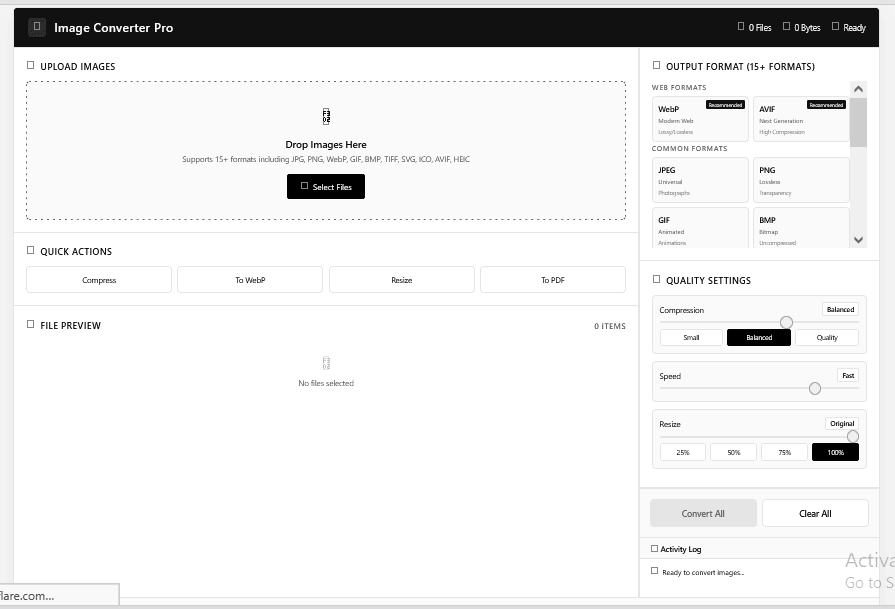
If you work with images daily—as a designer, developer, photographer, or content creator—you already know how much time gets wasted switching between formats. Image Converter Pro, the free online tool from Gdgraphic.com, solves this in one place. It converts JPG, PNG, WebP, HEIC, RAW, SVG, AVIF, and more, compresses files intelligently, and even builds PDFs from multiple images—all inside your browser with no uploads and zero privacy risk!
Ready to Optimize Your Workflow?
Download and use the tool completely free:
Why Image Converter Pro is the Best Free Online Image Converter
Unlike heavy desktop software, Image Converter Pro requires zero installation. It is incredibly fast, runs entirely in your web browser, and processes files locally on your device. Since your images are never uploaded to an external server, this tool offers 100% data privacy and security.
12 Powerful Image Conversion Features You Can Use Today

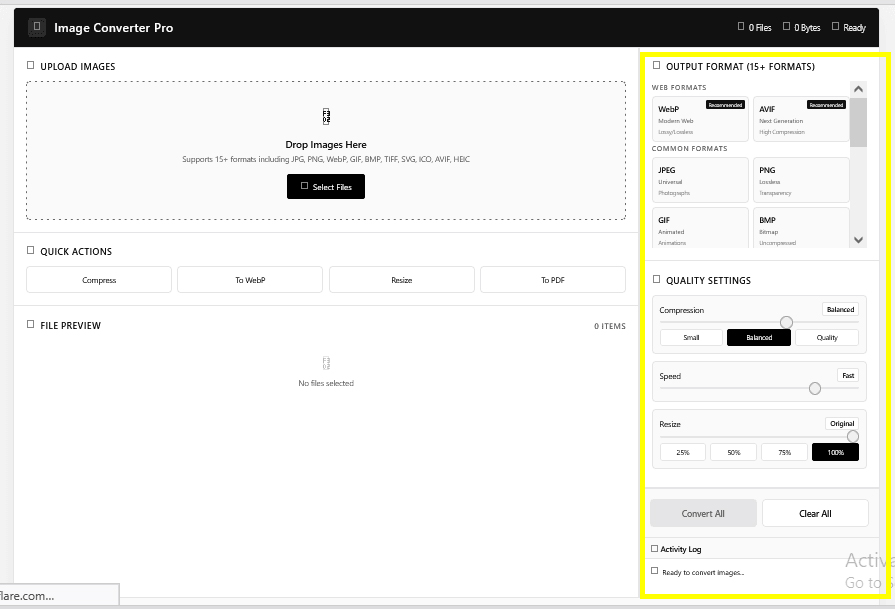
Whether you need to shrink files for web performance or prepare high-resolution graphics for print, this tool covers every major format:
1. Convert JPG to PNG (Free & Online)
Ideal for when you need transparency support or lossless quality for logos, vectors, or graphics. Simply upload your JPG, select PNG, and download instantly.
2. PNG to WebP Converter (Shrink File Size)
WebP is the modern standard for fast websites. Converting heavy PNGs to WebP can reduce file sizes by up to 80% without losing visual quality, boosting your site’s SEO and loading speed.
3. Convert Images to PDF (Combine & Sort)
Need to compile a professional document? Combine multiple images into a single, properly ordered PDF file in seconds. Enable ‘Combine All’ and ‘Sort by Filename’ for an organized result.
4. Batch Image Converter (Process in Bulk)
Stop converting files one by one! The batch converter lets you upload and convert up to 50 files simultaneously, saving you valuable time.
5. Convert HEIC to JPG (iPhone Photos)
Apple’s HEIC files often fail to open on Windows or older websites. Convert HEIC to JPG in seconds to make your iPhone photos universally compatible.
6. SVG to PNG Converter (For Logos & Icons)
Flatten sharp vector SVGs into standard raster PNGs for consistent previews, thumbnails, or web layouts.
7. RAW Image Converter (For Photographers)
Professional camera RAW formats are massive. Convert RAW files directly to highly compatible JPEGs or TIFFs to quickly share draft galleries with clients.
8. GIF to PNG Converter (Static Thumbnails)
Extract a clean, high-quality static frame from any animated GIF to use as a video preview or website thumbnail.
9. BMP to JPG & TIFF to WebP
Uncompressed legacy formats like BMP and TIFF consume unnecessary storage. Convert them to optimized JPGs or WebPs to save space while maintaining sharpness.
10. AVIF Converter (Next-Gen Compression)
AVIF delivers even better compression than WebP. It is the ultimate choice for modern web developers looking to optimize Core Web Vitals.
11. Create a Favicon (ICO File Creator)
Transform any logo or icon into a browser-ready favicon in multiple standard sizes in just 5 seconds.
12. Smart Image Compression (Custom Quality Preset)
Balance file size with visual clarity. Choose between Small, Balanced, or High-Quality presets depending on whether your image is for web, print, or storage.
Quick Comparison: Which Image Format Should You Use?
| Target Destination | Recommended Format | Key Benefit |
| Websites & Blogs | WebP / AVIF | Super fast loading speeds & excellent compression. |
| Logos & Graphics | PNG | Supports transparent backgrounds and lossless quality. |
| Print & High-Res Archives | TIFF / JPG | Retains rich details and colors. |
| iPhone Photo Sharing | JPG | Universally compatible across all devices. |
Why Local, Browser-Based Conversion is Safer
Traditional online converters require you to upload your files to their servers, posing serious privacy risks. Image Converter Pro processes your images locally using your browser’s processing power. Your files never leave your device, making it the safest option for sensitive personal photos, client designs, and financial documents.
Frequently Asked Questions (FAQs)
1. Is Image Converter Pro really free to use?
Yes! Image Converter Pro is 100% free with no hidden charges, premium paywalls, or account registrations required.
2. Do I need to install any software or browser extensions?
Not at all. It operates completely in your modern web browser (Chrome, Safari, Firefox, Edge). There is absolutely nothing to install.
3. Are my images uploaded to any server?
No. All conversion and compression occur locally on your machine. Your images remain private, secure, and entirely under your control.
4. Can I combine multiple formats into a single PDF?
Yes. You can upload a mix of JPG, PNG, and WebP files, select PDF as the output format, and enable the “Combine All Images” feature to merge them into one document.
5. What is the maximum batch file limit?
The batch converter can handle up to 50 files or a total of 200MB per batch. Performance alerts will guide you if you approach this limit.
6. Which format is best for improving website page speed?
Converting your images to WebP or AVIF is highly recommended. These formats drastically reduce file sizes, lowering page load times and boosting your SEO rankings.